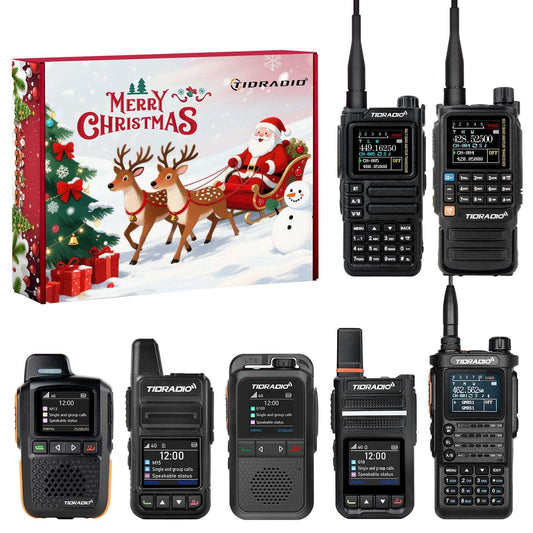
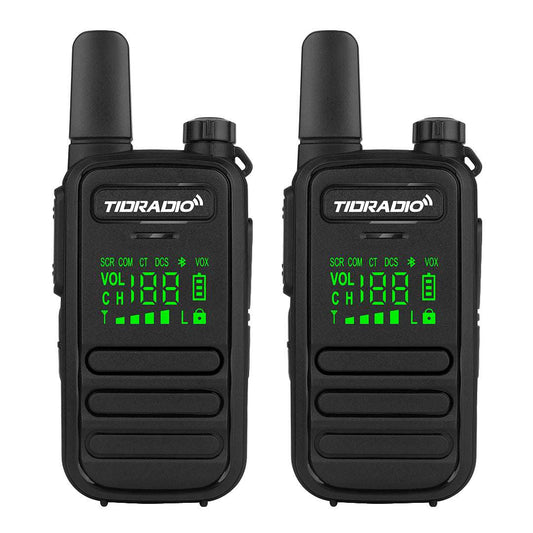
Accesorios Bluetooth para radios GMRS: configuración, compatibilidad y mejores actualizaciones
Las radios GMRS se utilizan ampliamente para la comunicación familiar, acampar, hacer senderismo, aventuras todoterreno y actividades al aire libre. Aunque una radio GMRS proporciona una comunicación fiable por sí sola, los accesorios adecuados pueden hacer que su funcionamiento sea más cómodo y flexible.
Los accesorios Bluetooth se han convertido en una mejora popular para los usuarios de radios GMRS. En comparación con los accesorios tradicionales con cable, las soluciones Bluetooth ofrecen una configuración más ordenada, un funcionamiento más sencillo y mayor flexibilidad para diferentes escenarios de comunicación.
Sin embargo, la compatibilidad de los accesorios Bluetooth depende de su radio. Algunas radios GMRS incluyen Bluetooth integrado y pueden conectarse directamente con accesorios Bluetooth, mientras que las radios sin Bluetooth requieren un adaptador Bluetooth.
En esta guía, explicaremos:
- Por qué utilizar accesorios Bluetooth con radios GMRS
- Diferentes tipos de accesorios Bluetooth para GMRS
- Cómo se conectan los accesorios Bluetooth a las radios
- Cómo elegir una configuración compatible
- Combinaciones recomendadas de radios y accesorios TIDRADIO
Si es nuevo en el mundo de las radios GMRS, comience con nuestra guía para principiantes:
Guía de radios GMRS para principiantes: Todo lo que necesita saber
¿Por qué utilizar accesorios Bluetooth con radios GMRS?
Los accesorios Bluetooth ayudan a mejorar la forma en que los usuarios operan sus radios GMRS, especialmente durante actividades al aire libre o en situaciones donde el acceso rápido es importante.
Los beneficios comunes incluyen:
- Comunicación inalámbrica
- Operación PTT más conveniente
- Menos desorden de cables
- Colocación de la radio más flexible
Por ejemplo, un micrófono Bluetooth permite a los usuarios mantener la radio guardada mientras controlan la comunicación a través de un accesorio externo.
Tipos de accesorios Bluetooth para radios GMRS
Los accesorios Bluetooth más comunes para radios GMRS incluyen:
- Micrófono Bluetooth
- Auriculares Bluetooth
- Botón PTT
Micrófono Bluetooth
Un micrófono Bluetooth proporciona una transmisión de voz cómoda sin necesidad de conectar un micrófono con cable tradicional.
El micrófono con cancelación de ruido Bluetooth Q2L está diseñado para radios TIDRADIO compatibles y proporciona:
- Conexión Bluetooth
- Reducción de ruido
- Operación PTT externa
- Cómoda comunicación inalámbrica
Auriculares Bluetooth
Los auriculares Bluetooth son útiles para los usuarios que prefieren una comunicación privada o el funcionamiento manos libres.
Se utilizan comúnmente para:
- Actividades al aire libre
- Comunicación laboral
- Situaciones que requieren un funcionamiento más silencioso
Botón PTT
Un botón PTT Bluetooth proporciona un control de transmisión rápido sin pulsar directamente la tecla PTT de la radio.
Es útil para los usuarios que necesitan un acceso más rápido a la comunicación mientras mantienen la radio colocada de forma cómoda.
Radios GMRS con Bluetooth integrado
Algunas radios GMRS modernas incluyen Bluetooth integrado, lo que permite que los accesorios Bluetooth compatibles se conecten directamente sin necesidad de adaptadores adicionales.
Las radios TIDRADIO con Bluetooth incluyen:
- TD-H3 Plus
- TD-H9
Estas radios pueden conectarse con accesorios Bluetooth compatibles, como micrófonos, auriculares y botones PTT, para una configuración de comunicación más flexible.
Radios GMRS sin Bluetooth integrado: Uso del adaptador Bluetooth TD-BL-2
No todas las radios GMRS incluyen Bluetooth integrado. Para radios compatibles sin capacidad Bluetooth, un adaptador Bluetooth ofrece una forma de conectar accesorios Bluetooth.
El adaptador Bluetooth TD-BL-2 funciona como un puente entre la radio y los accesorios Bluetooth.
La configuración de conexión es:
Radio GMRS → Adaptador Bluetooth TD-BL-2 → Accesorios Bluetooth
Con el TD-BL-2, los usuarios pueden conectar accesorios Bluetooth compatibles, incluidos:
- Micrófonos Bluetooth
- Auriculares Bluetooth
- Botón PTT
Esto permite actualizar radios compatibles con funcionalidad Bluetooth sin tener que reemplazar la radio existente.
Características adicionales del TD-BL-2
Además de la conectividad Bluetooth, el TD-BL-2 también es compatible con la programación en línea ODMASTER para modelos compatibles, lo que permite a los usuarios gestionar la configuración de la radio de forma más cómoda a través de la aplicación.
El TD-BL-2 es adecuado para:
- Usuarios que poseen radios sin Bluetooth integrado
- Usuarios que desean utilizar accesorios Bluetooth
- Usuarios que desean una configuración de comunicación más flexible
Cómo elegir la configuración Bluetooth GMRS adecuada
Elegir la configuración de accesorios Bluetooth adecuada depende de su modelo de radio y de sus necesidades de comunicación.
| Configuración de radio | Solución recomendada |
|---|---|
| Radio GMRS con Bluetooth integrado | Conecte el micrófono Bluetooth, los auriculares Bluetooth o el botón PTT directamente |
| Radio GMRS sin Bluetooth | Use el adaptador Bluetooth TD-BL-2 con accesorios Bluetooth compatibles |
Antes de comprar accesorios Bluetooth, verifique siempre:
- La compatibilidad Bluetooth de la radio
- Los modelos de accesorios compatibles
- El método de conexión
Configuraciones recomendadas de accesorios Bluetooth para radios GMRS
Diferentes usuarios tienen diferentes necesidades de comunicación. Las siguientes configuraciones proporcionan soluciones sencillas para principiantes, usuarios de actividades al aire libre y usuarios de radio avanzados.
TD-H3 Plus + Micrófono Bluetooth Q2L
La TD-H3 Plus es una excelente opción para principiantes que desean una radio GMRS sencilla con capacidad Bluetooth.
Junto con el micrófono con cancelación de ruido Bluetooth Q2L, los usuarios pueden disfrutar de una experiencia de comunicación más limpia y cómoda.
Recomendado para:
- Comunicación familiar
- Acampada
- Senderismo
- Actividades al aire libre
Radio GMRS TD-H3 Plus
Una radio GMRS con Bluetooth diseñada para principiantes y comunicación al aire libre.
- Radio GMRS/Ham de 5W
- Bluetooth integrado
- Compatible con accesorios Bluetooth
Micrófono con cancelación de ruido Bluetooth Q2L
Un micrófono Bluetooth diseñado para radios TIDRADIO compatibles con reducción de ruido y operación PTT cómoda.
- Conexión Bluetooth
- Reducción de ruido
- Control PTT externo
TD-H9 + Accesorios Bluetooth
La TD-H9 proporciona una configuración de radio GMRS más avanzada con soporte Bluetooth y compatibilidad flexible con accesorios.
Los usuarios pueden emparejar la TD-H9 con micrófonos Bluetooth, auriculares y botones PTT compatibles para diferentes escenarios de comunicación.
Recomendado para:
- Usuarios de radio avanzados
- Comunicación al aire libre
- Usuarios que desean más personalización
Radio Bluetooth TD-H9
Una radio portátil versátil diseñada para usuarios que necesitan funciones avanzadas y soporte para accesorios Bluetooth.
- Soporte Bluetooth
- Funciones de radio avanzadas
- Opciones de accesorios flexibles
Actualice radios compatibles con el TD-BL-2
Para los usuarios que ya poseen una radio compatible sin Bluetooth integrado, el TD-BL-2 proporciona una forma sencilla de conectar accesorios Bluetooth.
Configuración recomendada:
Radio → TD-BL-2 → Micrófono / Auriculares / Botón PTT Bluetooth
Adaptador Bluetooth TD-BL-2
Un adaptador Bluetooth que conecta radios compatibles con accesorios Bluetooth y es compatible con la programación en línea ODMASTER.
- Añada capacidad Bluetooth a radios compatibles
- Conecte accesorios Bluetooth
- Soporte de programación en línea ODMASTER
Cómo conectar accesorios Bluetooth a radios GMRS
El proceso de emparejamiento Bluetooth es sencillo y similar para la mayoría de los accesorios Bluetooth TIDRADIO compatibles.
A continuación, se muestra un ejemplo de cómo conectar el adaptador Bluetooth TD-BL-2 con el micrófono con cancelación de ruido Bluetooth Q2L.
Pasos para emparejar el TD-BL-2 y el Q2L
Paso 1: Encienda el TD-BL-2
Mantenga presionado el botón de encendido en el TD-BL-2 para encenderlo.
Paso 2: Encienda el Q2L
Encienda el micrófono Bluetooth Q2L.
Paso 3: Borre las conexiones Bluetooth anteriores
En el TD-BL-2, mantenga presionado el botón “–” para borrar los dispositivos conectados anteriormente.
Paso 4: Busque dispositivos Bluetooth
Mantenga presionado el botón “+” en el TD-BL-2 para buscar dispositivos Bluetooth.
El TD-BL-2 buscará y se conectará automáticamente con los accesorios Bluetooth.
Paso 5: Complete el emparejamiento
Tras una conexión exitosa, el accesorio Bluetooth podrá utilizarse para la comunicación y la operación PTT.
Para obtener instrucciones detalladas, vea el tutorial de funcionamiento:
Ver tutorial de emparejamiento Bluetooth →
Cree una mejor configuración de comunicación GMRS con TIDRADIO
En TIDRADIO, creemos que la comunicación debe ser sencilla, fiable y accesible.
La combinación correcta de radios y accesorios Bluetooth permite a los usuarios crear una configuración de comunicación que se ajuste a sus necesidades, ya sea para comunicación familiar, aventuras al aire libre o uso diario.
Desde radios GMRS aptas para principiantes hasta accesorios Bluetooth y soluciones de programación, TIDRADIO se centra en crear herramientas flexibles que ayudan a los usuarios a mantenerse conectados en más situaciones.
Preguntas frecuentes
¿Pueden funcionar los accesorios Bluetooth con cualquier radio GMRS?
No. La compatibilidad de los accesorios Bluetooth depende del modelo de radio.
Las radios GMRS con Bluetooth integrado pueden conectarse directamente con accesorios Bluetooth compatibles. Las radios sin Bluetooth pueden requerir un adaptador Bluetooth como el TD-BL-2.
¿Qué accesorios Bluetooth puedo usar con una radio GMRS?
Los accesorios Bluetooth GMRS comunes incluyen:
- Micrófono Bluetooth
- Auriculares Bluetooth
- Botón PTT
¿Puedo añadir Bluetooth a una radio GMRS sin Bluetooth?
Sí. Un adaptador Bluetooth compatible puede actuar como puente entre la radio y los accesorios Bluetooth.
El TD-BL-2 permite que las radios compatibles se conecten con accesorios Bluetooth, además de admitir la programación en línea ODMASTER.
Guías GMRS relacionadas
Obtenga más información sobre las radios GMRS, su configuración y consejos de comunicación:
- Guía de radios GMRS para principiantes: Todo lo que necesita saber
- Explicación de los canales GMRS: Canales, códigos de privacidad y repetidores
- ¿Hasta dónde puede llegar una radio GMRS? Explicación del alcance real
- Radio GMRS para todoterreno: Manténgase conectado en cada aventura
- Cómo configurar una radio GMRS: Una guía para principiantes
Explore las radios GMRS y los accesorios Bluetooth de TIDRADIO
La radio y los accesorios Bluetooth adecuados pueden hacer que la comunicación sea más fácil, flexible y mejor adaptada a sus necesidades.
Ya sea que busque una radio GMRS para principiantes, una mejora Bluetooth o una configuración de comunicación completa, TIDRADIO ofrece soluciones para diferentes usuarios y entornos.
Colección de radios GMRS
Explore las radios GMRS de TIDRADIO con soporte Bluetooth y funciones de comunicación flexibles.
Colección de accesorios Bluetooth
Encuentre micrófonos Bluetooth, adaptadores y otros accesorios diseñados para mejorar su experiencia con la radio.